7 Lead Generation Tips to Grow Your Business on LinkedIn

7 Lead Generation Tips to Grow Your Business on LinkedIn

LinkedIn can be one of the most powerful lead generation tools you have at your disposal, but you’ll need to use it correctly in order to get the most out of it.

This guide includes seven ways to generate leads from LinkedIn, including several that most marketers don’t realize exist. Check out these seven strategies for growing your business on LinkedIn and see how you can more effectively harness this powerful tool!

1) Optimize your profile

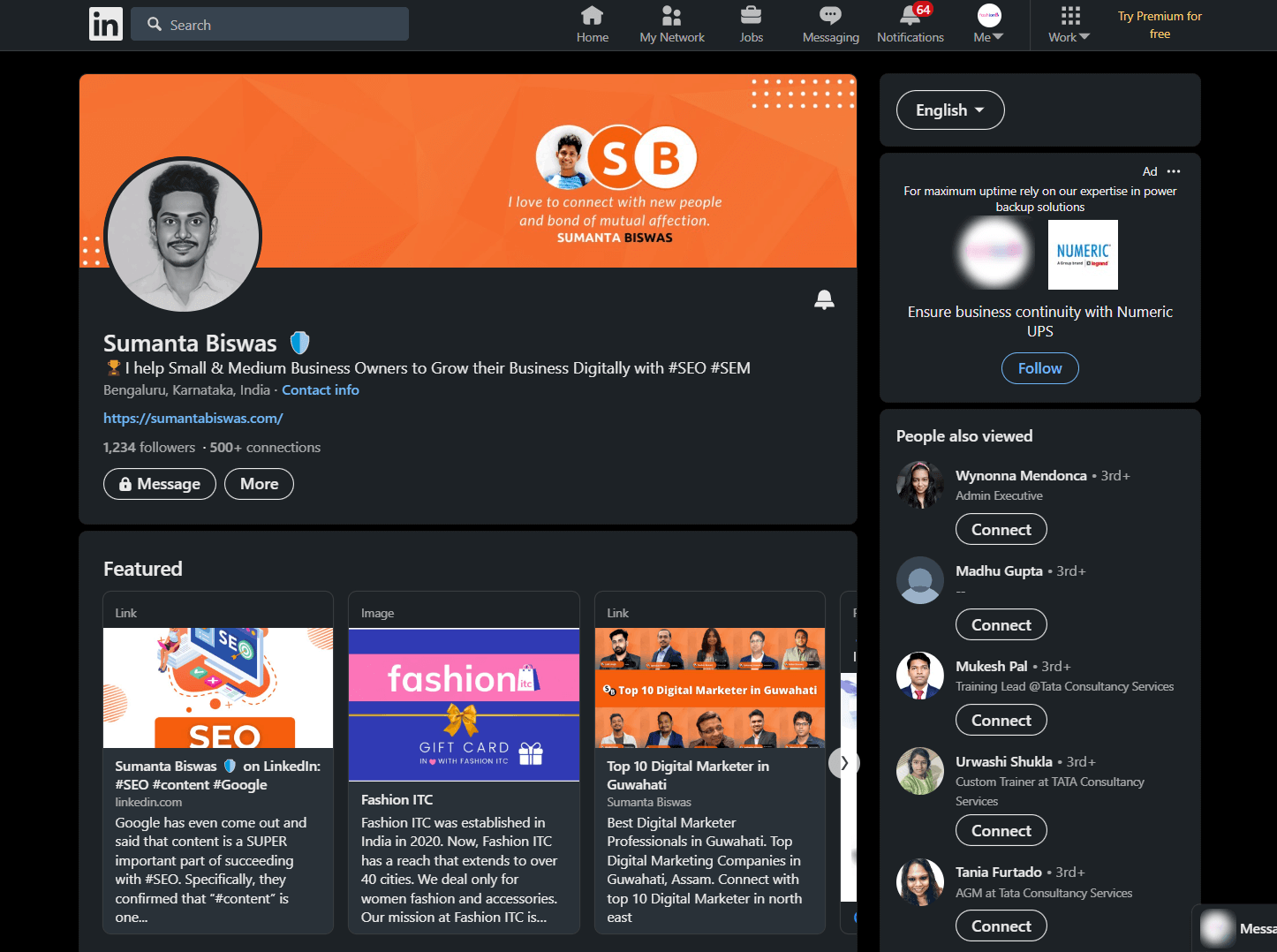
The first step in generating leads on LinkedIn is optimizing your profile. Make sure you fill out all of your information.

This will ensure that users can connect with you and find out more about your business. The more contact information you provide, such as email address and phone number,

means more people will be able to get in touch with you for potential sales or offers for your services.
 

Sumanta Biswas Linkedin

2) Build a list of personal connections

To grow your network of business contacts and leads on LinkedIn, start by gathering a list of current or past coworkers, friends, customers and classmates.

Then use these connections as your starting point for asking people you know to connect with you on LinkedIn.

Asking them directly will not only help you avoid wasting time sending out invitations that won’t be accepted,

but it also increases your chances of them accepting because they will recognize who you are.

3) Build an in-depth group of targeted connections

One of the best places to find new leads is right in front of you: your connections. Connections are a primary indicator of influence and trust in your network.

So, whether you’re looking for new clients or business partners, it’s time to put in some work and grow your connections list on LinkedIn.

Here are 7 tips that will help you get started.

4) Keep your profile up-to-date

If you want leads for your business, having a well-maintained profile is important. Make sure all information is accurate and professional-looking; don’t include a giant photo of yourself, as potential clients and companies may take that as too informal.

Always update your status (and have colleagues do so) with relevant news related to your field or industry—this way, people are more likely to visit your profile.

5) Share relevant content via Groups

Leverage LinkedIn’s professional networking features by joining Groups relevant to your industry. Since so many professionals are using these groups, you can expect a high level of engagement and people looking for leads.

You can even schedule posts or other content ahead of time and have it post automatically based on your current engagement with others.

This is also a great place where you can generate leads for your business by sharing content that could potentially be relevant for potential customers or clients interested in getting help in their field.

Leveraging different aspects of LinkedIn allows you more opportunities to create more leads and get more sales from existing ones.

6) Follow the right people

If you’re struggling to get leads for your business, one of your first priorities should be to follow more people—and do it effectively.

In fact, in a survey of 15,000 B2B decision makers, 73% indicated that showing interest by following me was their favorite lead-generation tactic via social media.

And an even higher percentage (78%) said they were very likely or somewhat likely to follow back if a business took interest in them by way of social media.

7) Monitor your activity

Be strategic about which groups you join and what kinds of activity you engage in. Keep track of how often you’re posting and responding, as well as your level of engagement.

You should make sure that you’re spending time interacting with quality prospects instead of just spamming your profile out there all willy-nilly.

Keep in mind that it’s easy to lose touch with old friends and let our relationship slide when we don’t visit as often as we used to. You can follow me too on LinkedIn.

5 Tips for Effective Email Marketing Strategy for Small Businesses

5 Tips for Effective Email Marketing Strategy for Small Businesses

Email marketing should be an essential part of any small business’s online marketing strategy. Not only does it allow you to market to a wide audience, but it also offers several benefits over other digital marketing channels such as Facebook and Google AdWords that are well worth the effort involved in setting up email marketing campaigns and sending out regular emails to your subscribers.

Not sure where to start with your email marketing? Here are 5 tips that can help you create an effective email marketing strategy for your small business.

1) Personalize Your Emails

When you’re emailing subscribers, take a few minutes to look up their name. Include it in subject lines and body copy, but be careful not to go overboard—you don’t want them to feel like you’re spamming them.

You should also consider using an email marketing service, such as MailChimp or HubSpot. These will help you set up templates, track open rates and other important metrics, and much more.

The latter even includes social media integration so you can automatically send your subscribers new posts from your company’s Facebook page.

Both services are free for basic accounts, so there’s no reason not to use them!
The Power of Follow-Up: If someone doesn’t respond to your first email blast, send another one two weeks later. This is especially useful if you are trying to connect with influencers who might get hundreds of emails per day.

2) Be Wary of Clickbait Headlines

While it may be tempting to use clickbait headlines to entice people into reading your emails, keep in mind that they’re a sign of desperation.

Do you really want to send desperate-sounding emails? This doesn’t mean you can’t write compelling headlines—just that you should focus on crafting titles that capture your target audience’s attention without relying on cheap tricks.

Also, HubSpot has put together some tips on how to create great email subject lines. Be sure to check them out!

3) Include a Benefit Statement in the Subject Line

Your subject line is critical to getting your email opened and read.

The reason?

Your subscribers are often flooded with dozens of messages every day, so they need a compelling reason to open your message over everything else that’s vying for their attention. Make it easy on them by including a benefit statement in your subject line.

4) Use Data to Personalize Content Based on Behavior

Most email marketing tools allow you to track whether or not users are opening your emails, as well as other actions they take.

Take advantage of these capabilities to ensure that your messages resonate with each segment of your audience. If someone hasn’t opened an email in a while, try sending another one with a new offer.

If he regularly clicks on a certain link in an email, find ways to encourage him to click it again. (For more inspiration, check out what HubSpot, Neil Patel customers are doing on their blogs.)

5) Use Embedded Links in Emails

If you use email marketing to promote your business, you probably know that a major component of most campaigns is sending traffic to a landing page or squeeze page.

If your contact form uses embedded links in emails, you don’t have to remember to add these links to each email individually when it’s time to send out your campaign—you can just send an email with a clickable link straight from MailChimp which I personally use.

Leave your question on comments. Thank you for reading this blog. 

Top 10 Digital Marketer in Guwahati

Top 10 Digital Marketer in Guwahati

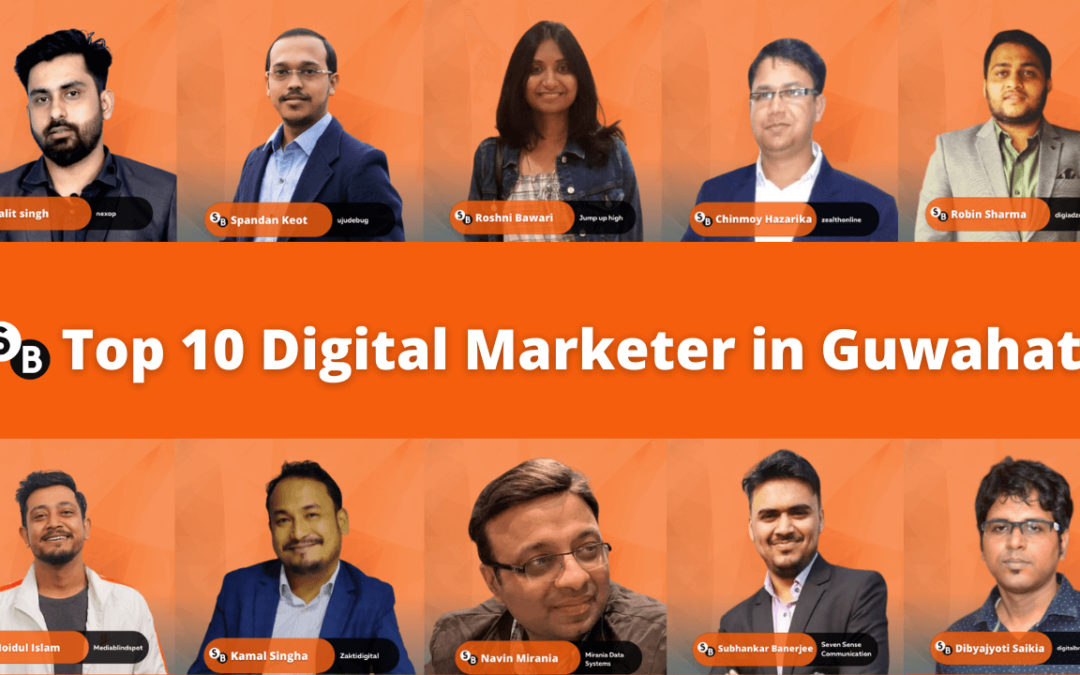
Digital Marketing Agencies in Assam are growing like anything. I don’t think any business can run without doing digital marketing in 2022 and future. Over the last several years digital marketing has grown more than 300%.  In this article I have mentioned top digital marketer in Guwahati, Assam along with their contact details. Also there few of them registered as  digital marketing agency in Assam.

Best Digital Marketing Agencies in Guwahati, Assam

I have found top Digital Marketing Agencies in Guwahati and providing services around pan India. 

  • Lalit Singh

Lalit singh is a Digital Marketing growth hacker, Sales funnel expert in automation. He is Director, Founder of Nexop Technology and Nexop Academy.

Lalit is leading on eLearning platform in Assam and other states as well. He is always creative when it comes on marketing part.

He has Digital Advertisement Agency where he serve client’s in various sectors like E-Commerce, Education, HealthCare, Automotive, Event Management ect.

Career: Director, Founder of Nexop Technology and Nexop Academy.

Experience: He has more than 5 years experience on field of Digital Marketing, Business Growth Hacker and Entrepreneurship.

Education: B.E (Electrical Engineering) , Guwahati University.

Organization: Nexop Academy and Nexop Technology.

Contact Details: LinkedIn , 

Lalit-singh
  • Spandan Keot

Spandan Keot is a very good business developer, entrepreneur, full stack developer and human being. He has strong technology and market knowledge.

 Spandan has worked with many software industry from intern to CEO like Ujudebug, Movietonne, NIMS Pvt Ltd, NVAID, Aharah, CouponAllTime. Now he is leading marking and backend development in Guwahati, Tezpur, Assam.

Career: Chief Executive Officer at Ujudebug.

Experience: He has more than 6 years experience on Technology Enthusiast, Digital Marketer and Web Developer.

Education: Bachelor of Engineering (BE), Guwahati University.

Organization: Ujudebug and Movietonne.

Contact Details: LinkedIn, Twitter

Spandan-Keot
  • Roshni Bawari

Roshni Bawari is a Public communication and marketing strategy Specialist. She has established Jump Up High Digital Marketing and Communications Agency in the year of 2015.

She has worked with various organization like Axis bank, MP Narendra Modi.

Roshni is life long learner and that’s always give her the upper edge in an industry that evolves in a blink. Now she is serving at metro cites like Bangalore, Pune, Guwahati. 

Career: Founder – Jump Up High Digital Marketing and Communications, Axis Bank, narendramodi.in.

Experience: She has more than 10 years experience.

Education: IIM Bangalore, B’Com, MBA – PGDM.

Organization: Jump Up High, Axis Bank.

Contact Details: LinkedIn, Twitter.

Roshni-Bawari
  • Robin Sharma

Robin Sharma is a Digital Marketing Trainer, Founder of DigiAdzo. He has started his career as SEO Executive than Digital Marketing Specialist and Google Ads Campaign Manager at Accenture.

He is also very good mentor, leading team and growing with community, Where it shows results of handwork. He has worked difference city like Gurgaon, Jaipur a part from his hometown Guwahati .

Career: Ads Campaign Manager, Trainer & Founder of DigiAdzo.
Experience: He has more than 7 years experience as Digital Marketing Professional.
Education: Bachelor’s Degree Electronics and Communications Engineering at Kautilya Institute of Technology & Engineering.
Organization: Accenture, DigiAdzo & DPFOC.
Contact Details: LinkedIn, Mobile No: 97072 18056

Robin-Sharma
  • Chinmoy Hazarika

Dr. Chinmoy Hazarika is the CEO of Zealth Marketing. He is also co-founder of gentledental.care. He is hardworking and very passionate about whatever he does.

Chinmoy has bundle of knowledge in every filed along with Doctor profession. Being a doctor he has trained himself as good human. Also master on playing chess and an excellent writer as well.

Career: CEO at Zealth Marketing and Co-founder at Gentledental.care.

Experience: He has more than 10 years of experience in filed.

Education: MBA in Marketing(NMIMS), Bachelor of Dental Surgery (The University of Hong Kong)

Organization: Zealth Marketing, Indian Oil Corporation Limited and Gentledental.care

Contact Details: LinkedIn , Twitter, Mobile Number: 07896646246,

Email: drchinmoyhazarika@gmail.com

Chinmoy-Hazarika
  • Moidul Islam

Moidul Islam is the CEO of Blindspot Media. He is expert on marketing strategy to build brand image on market.

He and his team approach for your business and nurture it for proper growth. Now he is leading market in Assam and other city as well.

Apart from his profession he is member of Social Services.

Career: CEO, Co-founder, Marketing Head.

Experience: He has more than 6 years experience.

Education: MBA at Globsyn Business School, B.Tech at Biju Patnaik University of Technology

Organization: Exclusive Advertising Private Limited , Blindspot, Cipher Studios.

Contact Details: LinkedIn, Email:tanveer.islam24865@gmail.com

Mobile Number: 8724805698

Moidul-Islam
  • Kamal Singha

Kamal Singha is the Director of Zakti Digital Services. He has started his career as a Editor at Shvoong. Kamal stand apart is his excellent crisis management skills and also very good team leader.

He and his team member redefine the digital space to create unique ideas that enhance business growth. 

Career: Editor, Assistant Manager , CEO.

Experience: He has more than 5 years experience.

Education: BA at Bangalore University.

Organization:  Manthan Services & Zakti Digital Services.

Contact Details: Twitter, LinkedIn.

Kamal-Singha
  • Navin Mirania

Navin Mirania founder of Mirania Data Systems, Freelancer, Content Creator. He has very strong knowledge in every domain in Digital Marketing.

Navin Mirania also travel person and it help him to word creatively. He offers Data Entry, Social Media, Internet Marketing, Email Marketing, WordPress, HTML, Graphics, Content Writing, CRM, eCommerce, Lead Research, LinkedIn Research ect.

Career: Founder at MDS Online

Experience: He has more than 10 years of experience.

Education: Bangalore University.

Organization:  MDS Online.

Contact Details: Phone: +91-9864060584, Email: navinmirania@hotmail.com

Navin-Mirania
  • Subhankar Banerjee

Subhankar Banerjee is the Founder of Seven Sense Communication. He has strong commend on Communication and Public Relation.

Subhankar has worked with many reputed brands like Rapido, Dunzo & Indian Oil. He also support NGO’s and Volunteer of Participatory Development Programme at Tezpur University.

Career: Founder & General Secretary.

Experience: He has more than 5 years experience.

Education: M.A at Assam University.

Organization:  Seven Sense Communication.

Contact Details: Instagram, Twitter , Phone: +91- 9706494608,

Email: subhankarbanerjee444@gmail.com

Subhankar-Banerjee
  • Dibyajyoti Saikia

Dibyajyoti Saikia is a owner of  Digital Branding Agency. He helps small business to growth with using digital platform. He also provide Web Design Service, Business Consultant Service all over Assam.

Career: CEO, Marketer

Experience: He has few years of experience in Digital Marketing.

Education: Bachelor of Arts – BA ( Guwahati University)

Organization: Digital Branding & Paidverts Networks Pvt.Ltd

Contact Details: LinkedIn, Twitter, Email: dibya220@gmail.com

Mobile Number: 7578809266

Dibyajyoti Saikia

Conclusion

This is the list of digital marketers in Guwahati, Assam that I’m able to come up with names noticeably. I’m sorry, If I missed great digital marketer names that I do not know them.

If you know other great digital marketers in Assam, I would love to know their name and about their work Experience in digital marketing. Please do comment bellow their names!

Google keyword planner: Best Free SEO for everyone 2023

Google keyword planner: Best Free SEO for everyone 2023

Keyword Planner is a free tool. Google created this tool to help pay-per-click advertisers, wherein all marketers use this tool even if you have paid tools like ahrefs, SEMrush, Mangools,MOZ, or anything else.

There are a lot of advantages of using Google Keyword Planner.

It’s especially important for local SEO and analyzing devices data. For example, when the Masters create content, they usually pay attention for desktop version of their website.

However, mobile traffic will continue to increase and surpass desktop traffic because the number of mobile users is growing all the time.

Today, mobile traffic is over 76%, desktop traffic over 23%, tablet traffic is less than 1%. Some keywords are completely mobile.

In this article, I’ll show you advantages and disadvantages of using Google Keyword planner.

I’ll compare data with other keyword tools. Today I want to share with you about Google Keyword Planner.

First time I met this tool in 2019, when I launched my first project -it was online shop- and I needed to find keywords that related with my business.

And I think that I didn’t have other alternatives like I have today from paid tools and other free tools.

If you’re interested to know more tools, you can visit pages on to website, where I reviewed all online tools.

And  a lot of these tools you can use to find your keywords.

You know, I use Google Keyword Planner even today, when I have access to some paid tools because on Google Keyword Planner, you can find some different data that you can’t get from other paid tools.

And you know, many paid tools just take this data from Google Keyword Planner.

If you want to have this tool, you need to have account on Google Ads. If you don’t have this account, you can register in a few minutes, just submit all data in adsgoogle.com.

And after this, you need to switch to expect more, and yes, that’s it, and you can use Google Keyword Planner.

I opened the page on my website, where I review all SEO tools. If you want to find the direct link to Google Keyword Planner, you you need to click the filter “keyword research” on the left side and to choose the filter “free”.

How does google keyword planner work?

And after this you can find in a quick way this tool, here, Google Keyword Planner, and I opened this tool.

After registration you will see this window, what you need to do, to click “tools and settings” and open “Keyword Planner“.

A few seconds and after this you will see two windows, you can use all this windows, we can start from first one.

Here you can type your keywords, for example, SEO, digital marketing, marketing, SMM, you can divide them by coma.

Now you need to change language to your language. I change to English, and you can change location to your country.

For example, India.

After this, to save the additional function to add some website here, you can add website or not, it’s up to you.

But if you add here some successful competitor that ranks on Google, you know, it helps Google ads to understand what type of keywords you need to have.

We can start without setting any websites and after this, we will check with this setting. Click to get results.

And  we can see the results from last12 months. You can change location here, for example,

If you want to know only information about your native city, you can use Miami and delete the India and after this, you can see that average monthly searches decreased a lot.

You can change language or search networks, Google or Google and search partners.

You can use search partners as well, it might be YouTube, or any other search networks from Google.

And  if you have some seasonality in your business, it’s not good to have data from last month or last 12 months,

For example, if you sell Christmas gifts, it’s better, you know, to set up data from, I don’t know, from October to November.

I can change here to November 2020, or even December because it helps to understand what type, what volume we can have here.

If I change keywords to “christmasgifts”, we can check the result, and we will see some average monthly searches.

Google Keyword Planner

And if I use from June to July, you will see the big difference because that time people don’t search for Christmas gifts.

We see that our data decreased a lot. You can customize all of this in your Google ads.

Okay, I used it for last month. And here we can change to our keywords like, SEO, digital marketing, SMM.

If you want to use famous website that ranks high in Google, what you can see that we get a 2206 keyword ideas available for those keywords.

And even this tool proposes some other keyword ideas.

How to find google keyword planner idea?

You can add this keyword and use if these ideas are related with your business. And they have different columns.

In the first column, we see the list of keywords. The second column, we see volume. Competition is related to Google Ads competition, it’s not suitable with SEO competition.

And in this tool you can check SEO competition, SEO difficulty. What I like here that you know the average bid for Google ads and the maximum payment for Google ads.

You can use this data to analyze commercial intent of this keywords. If advertisers barely pay this money, that means that they can earn.

Okay, you can download all this data to Google, just click here, and you will get all this data in CSV or XLS format in your operation system.

What we can use here, you can go back to Keyword Planner and use this type of window here.

You can get exact data for some key words if you have your list of keywords for, example, SMM, SEO, marketing, social media, ads, paid ads, ppc.

And after this, you will get data only from  our list of keywords you can see here cost per click, how many clicks, impressions, cost, everything would you need to know from your list of keywords.

Even, we have negative keywords, you can add here, if you have a huge list of keywords, you can add like free.

We can use free. And for example, if I want to delete some keywords from my list, just click and delete them.

We have negative keywords, and we see that we don’t have this data by using negative keywords.

seo tools

 Go back to Google Keyword Planner, and we can use this window one more time.

If you want to check your computer, just type their website here, like hubspot.com.

We can use famous resource that spends a lot of time, you know, to create high-quality and valuable content. And after this, we can have results from all this website.

You know, the volume is not good. We can use data from last 12months, and for example,

If you want to delete their brand keywords, just click at filter here, you can use this option “Keyword text” and click “does not contain”.

I use hubspot just hubspot, and apply.

After this, we will have only keywords that are related with hubspot without brand keywords.

Awesome !

I think that you don’t like this metric from10 – 100. It’s weak metric. And what you need to do here, just highlight keywords that you like more.

You can choose what you want to check and add this keywords to your plan overview, and go to this option “Plan overview”.

And we see here the list of this keywords and all impressions. If you want to know exactly impressions just increase your cost-per-click, we can use the maximum cost-per-click.

And after this, Google will show us exact impression for these keywords, you can click here.

And there, you will know exact impressions for all your keywords. After this, for getting this data, you don’t need to set up pay-per-click advertisement.

What I like more on this tool that you can analyze devices data, for this keywords, we see that computers have more traffic and locations data.

Right now, we use Miami, Florida, We can change that one, to India, save this data.

I need to go back and click it one more time, plan overview, and after this, you will see exact locations for this keywords.

California 15%, Florida 9%, New York 7% US 11%. And it’s suitable data.

If I want to know, for example, other keywords, we can change keywords, for example, to use.

I don’t know, which is more related for mobile. Example, baby crying.

Okay, we can check these keywords, baby crying, add them to our plan overview, and go there.

seo tools

You know, we need to delete the old plan overview. I want to delete this one.

And after this, you can check for other keywords and you will get other data, you know. Just give me few seconds, I need to delete all of them or remove them.

You can see that I need to remove one more time. Add this keywords one more time to plan overview.

If I go here, we can check that mobile traffics more than computers traffic.

It’s important, you know, to analyze what type of content we need to create?

Because it’s a big problem when the Masters usually pay attention only for the stock version of their websites.

If you compare this tool with Ubersuggest.

I think Neil Patel bought this tool for $120,000, and today he invests even more to develop this tool.

What I like on this tool is that you have this parameter as your difficulty because in Google Keyword Planner, you don’t have this metric.

And we see the same, volume, cost-per-click. You don’t need even to register in this tool to get all this data, keywords, ideas.

For your keywords, you have to compare data with some websites that rank in the top 10.

And you can use this to answer the public. I typed SEO and get data with a lot of questions that are related with my keywords.

It’s useful to create this content propositions and many other data. And all of them are free tool, you don’t need to pay.

But I think the answer the public, last time, tried to monetize this tool to use some progression.

And if you use free version, you don’t have volume data, but on Ubersuggest, you have this data.

I think that you can use all these tools, and to choose metric, all of them are free.

And that’s it for today. Don’t forget to subscribe to ask your question bellow,  and  subscribe email update, and you will get all information about my next blog post. See you next time thank you.

SiteGround Review: Uptime, Speed, and Support

SiteGround Review: Uptime, Speed, and Support

Choosing a web host can be difficult, particularly if you’re not sure what the biggest priorities should be. There are plenty of options available, from both large hosting companies and those that specialize in certain niches or industries.

SiteGround Hosting is our choice for many of our websites because they offer excellent speed and security features, as well as an affordable price point without sacrificing support quality.

In this review of SiteGround Hosting, we’ll cover their hosting plans, performance, security features, and more to help you decide if they’re the right host for your next WordPress site or online project.

Fast and secure web hosting is mandatory for any personal or business website. I have been using Siteground web hosting for the last 34 months. It is faster than before 192% website speed increased.

  • Hosting Service ★★★★★ 95% 95%
  • Hosting Features ★★★★ 89% 89%
  • Disk Space ★★★★★ 90% 90%
  • Uptime ★★★★★ 99% 99%
  • Customer Support ★★★★★ 100% 100%
  • Price Value ★★★ 81% 81%

About Siteground

SiteGround is registered companies in the USA, UK, Bulgaria, and Spain.

They have four offices and several datacenter locations around the world. They have been delivering exceptional service for our websites for 16 years.

In the year of 2004 SiteGround found by a few university friends . SiteGround is operating with more than 500 employees from 4 country.

SiteGround partners with multiple companies such as SingleHop, SoftLayer, CloudFlare, OpenSRS, cPanel, GlobalSign, Softaculous, Spam Experts, Open Classifieds, Printful.

It is hosting 2 million domains around the world and I one of them. My six website also are hosting with SiteGround.

SiteGround Pricing 

If you’re looking for a great hosting solution for your WordPress projects, SiteGround is a great option.

They rank near the top of all web hosting companies for both uptime (99.99%) and speed (391 ms). SiteGround is an affordable and exceptional web host thanks to their fantastic support, focus on security, and server speed.

I highly recommend SiteGround if you’re looking for a new web host!

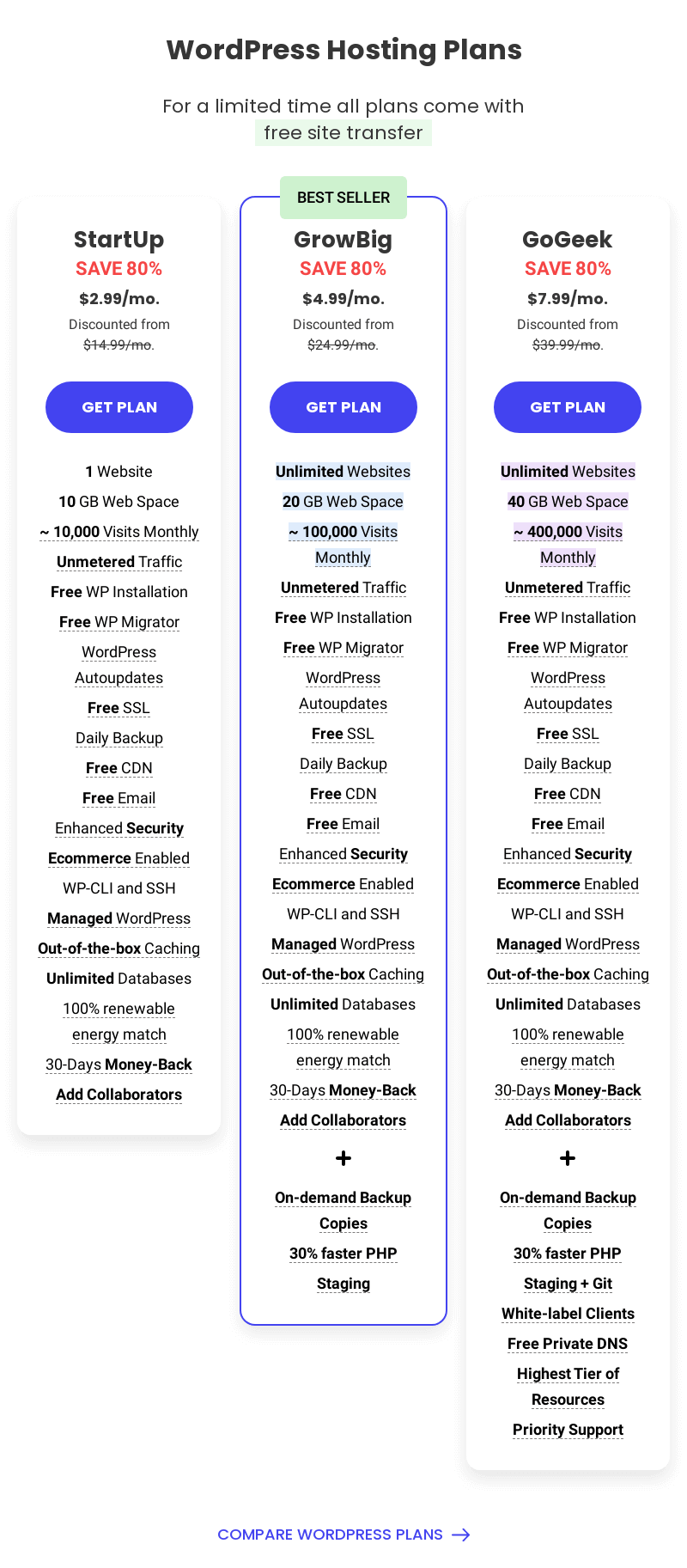
SiteGround Pricing

Performance and Reliability of Siteground

Yes it is correct that uptime is excellent as SiteGround claims an uptime of 99.99 percent.

Every one expect 100 percent uptime for their website but it is impossible to maintenance network even some time Google goes down.

They also have excellent page load times under 750ms.

Their main data center partner Google Cloud matches 100% the energy consumed by google global operations with renewable energy and maintains a commitment to carbon neutrality.

My websites are excellent more then 90 percent now becouse of SiteGround but mobile readeblity are little lower then desktop as per Google reports.

If your domain with third party I recommend you to transfer and increase your wibsite ten time faster.

Features of SiteGround

SiteGround provides a basic StartUp shared hosting plan for $3.95/mo. This plan is only for a single website.

They have the Default PHP version managed by Siteground (7.1) and Custom PHP Versions 7.4, 7.3, 7.2, 7.1, 7.0 & 5.6 as per your requirement.

Unlimited MySQL database, free email accounts, Automated Daily Backup, Free Shopping Cart Installer, Free CDN and SSL with Each Account, Free Drag & Drop Weebly Sitebuilder with this plan.

SiteGround StartUp plan 10GB Space and 10,000 Visits limit, it is not enough but for starting website is quite good.

SiteGround has 30 Days of  Money Back and 100% Renewable Energy Match which is a partner with Google. Also, they provide tools for website scanners for free with any plan and Spam Protection.


  • 24/7 customer support: You can always reach out to SiteGround’s customer support team 24/7 via phone, chat, or email. They are quick to respond and always ready to help.
  • 99.99% uptime: SiteGround’s uptime is some of the best in the business. You can rest assured that your website will be up and running nearly all the time.
  • 391 ms speed: SiteGround’s speed is impressive. Your website visitors will have a fast experience no matter where they are in the world.
  • Affordable pricing: SiteGround has a variety of plans to choose from, all of which are very affordable.

SiteGround: The Pros and Cons

SiteGround is a great hosting solution for all your WordPress projects. They rank near the top of all web hosting companies for both uptime (99.99%) and speed (391 ms).

SiteGround is an affordable and exceptional web host thanks to their fantastic support, focus on security and server speed.

However, some users have found that their customer service can be slow to respond at times and that their pricing is a bit higher than some of their competitors.

Overall, though, SiteGround is a great choice for those looking for a reliable and fast web host.

SiteGround Pros

  • Excellent  uptime 99.98%
  • Very Good customer support
  • Unlimited Databases
  •  SSL, CDN and Email Free for all user
  •  Automatic WordPress updates
  • Free daily automatic backups and restore

SiteGround Cons

  • Strict data over-usage policy
  • Not the cheapest web hosting around
  • Limited storage for the cheapest plan

Fantastic Customer Support

Customer Support of Siteground is excellent in terms of solving problem and quick response. They have highly skilled support team who are available 7/24.

SiteGround support center has multiple Channels to fast problem resolution and live assistance with Live chat, Phone support and Help desk tickets.

Even Instant Self-help Pinned help on every page, Smart AI chat bot and Automated solutions are available. They have 100% customers confirm satisfaction rates.

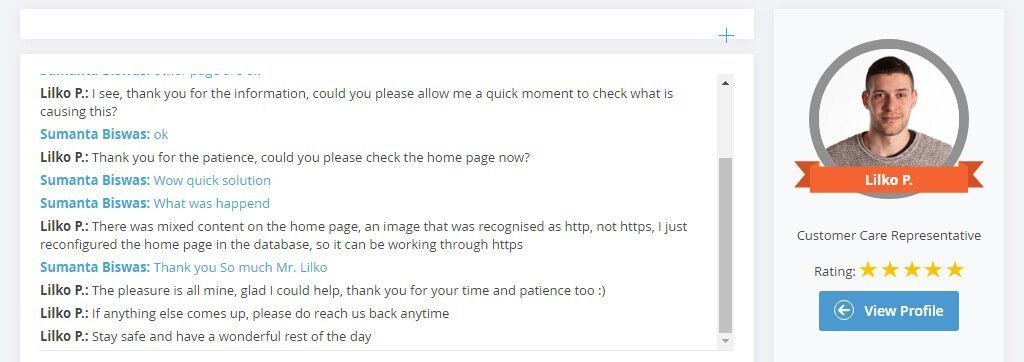
As you can see I had a problem with my website SSL and it had successfully resolved with in few minutes. SiteGround resolve with a single reply and average estimate time a few hours. 

I had a great experience with SiteGround customer service. I contacted them with a question about my account and they got back to me within 8 minutes. They were very friendly and helpful. I would definitely recommend SiteGround to anyone looking for a great web host.

SiteGround-Cloud-Customer-Support

FAQs of SiteGround

Loader image

The price of SiteGround hosting plans starts at $3.95/month.

The average speed of SiteGround is 391 ms.

SiteGround offers 24/7 customer support via phone, live chat, and email.

Yes, SiteGround offers a 30-day money-back guarantee on all hosting plans.

Conclusion

Overall, I highly recommend SiteGround as a hosting solution for all your WordPress projects.

They are an affordable and exceptional web host thanks to their fantastic support and focus on security and server speed.

If you’re looking for a reliable host with great uptime and speed, then SiteGround is a great option.

CRM in Retail

CRM in Retail Book
Read Buy Now