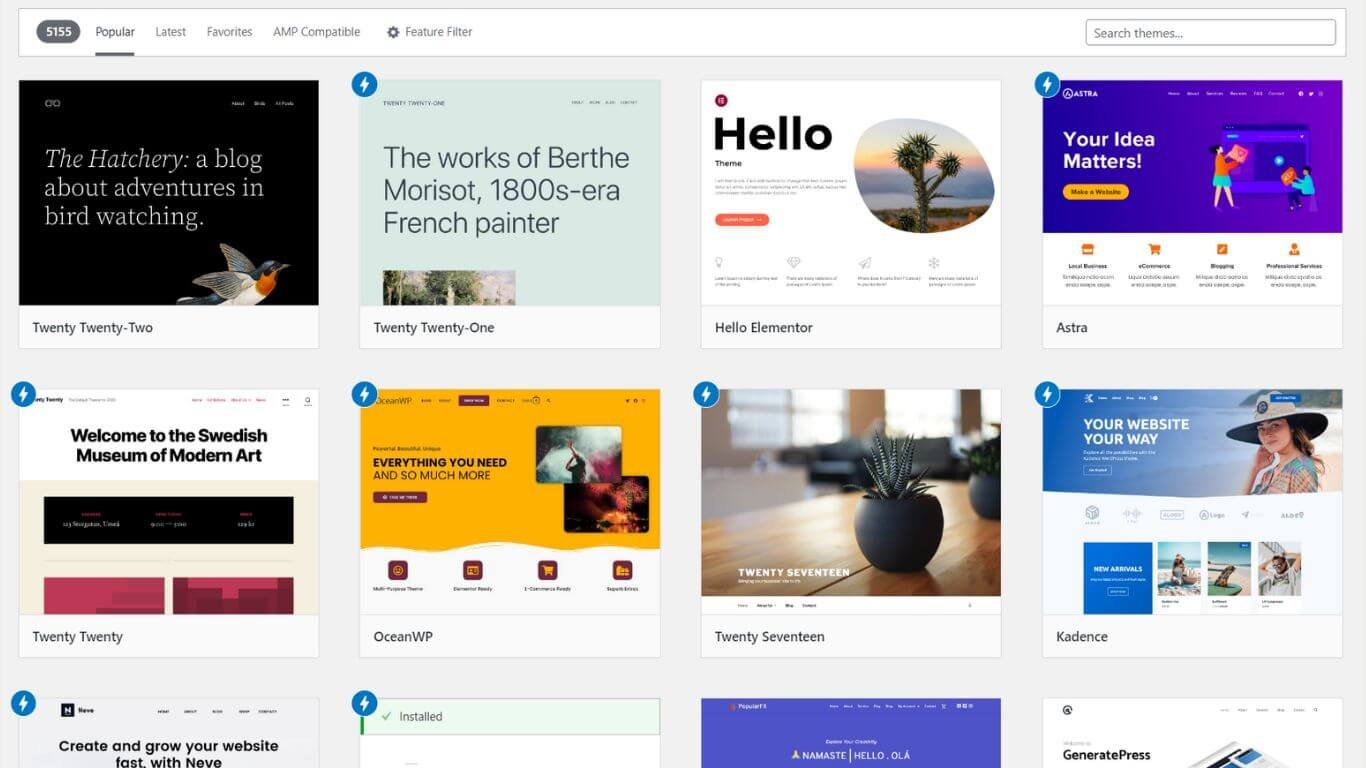
Divi Theme Review: The Ultimate WordPress Theme and Visual Page Builder

Divi Theme Review: The Ultimate WordPress Theme and Visual Page Builder

Divi Theme is the Ultimate WordPress theme from Elegant Themes and is designed to help you get the most out of your website.

It’s also complete with an awesome drag-and-drop page builder that makes building an entire website easy as pie.

Here’s everything you need to know about Divi and why you should use it on your next website project.

Divi WordPress Theme

Divi Features

This theme is responsive and resizable. Divi comes with over 40+ pre-made layouts, and an extensive library of over 200+ premium-quality layouts, so you can build your website without any hassle.

Elegantthemes includes the most advanced responsive design tools and options that exist in any other WordPress theme today.
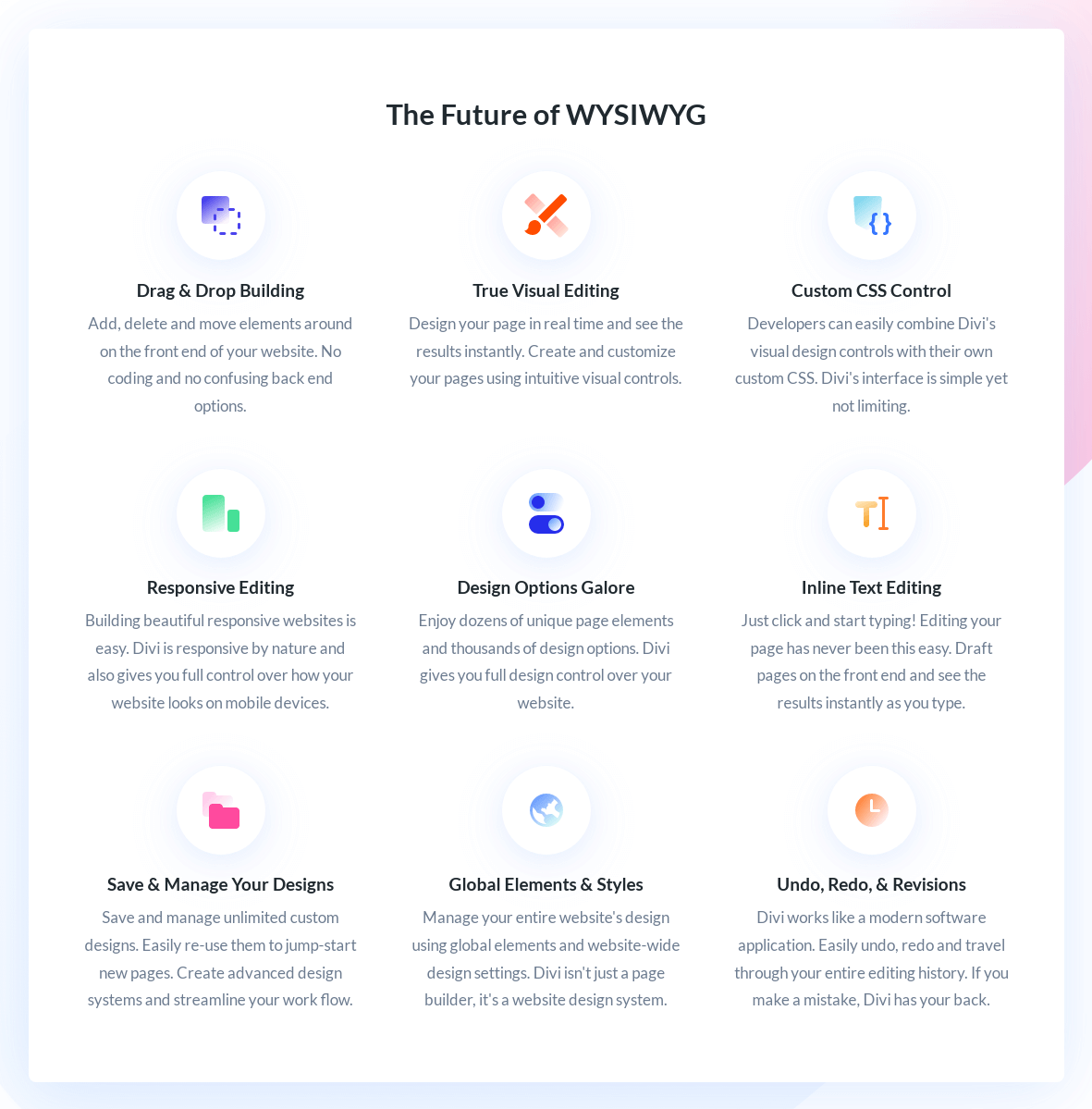
The Future of divi screenshot

It offers Auto Update, Easy Import and Export, Responsive Landing Pages, Contact Forms, Visual Editing, and Pre-made Templates to use.

Recently they introduce Divi Cloud, Where you can save your design, layouts, ect. Now All Divi users can store their designs at Divi Cloud for free up to 50 items and for more you can upgrade the cloud plan.

Also, they are trying to collaborate with divi user and their team in real-time and team members can access your products and services. Where the team or client can create API Key, and get Cloud and Premium Support at the same time.

You can manage all the permissions of your team as an admin or owner just by using some custom roles on your account dashboard.

Divi Theme Builder

It’s the perfect solution for everyone who wants an accessible way to design, manage, and update their content on WordPress.

Divi is used by top agencies and freelancers around the world, with thousands of five-star reviews from clients.

With every release, Elegant Themes offers new tools and features to keep Divi at the forefront of web design. And now, they introduce one of our most ambitious projects yet – The 3rd Generation Divi Theme Builder!

New Features Include Custom Design Settings for each individual module in your layout; Module Customizer; Multiple Type Layouts (e.g., Full Width or Boxed); Layout Preview Mode; Border Toolkit; UI Improvements.

Try this divi theme free options at elegantthemesdemo.com.

Divi Theme demo

Elegant Themes also offers a separate Divi Plugin that can be used to extend the theme’s functionality and provide a content builder.

This plugin is available for purchase separately, but you can also purchase it as part of the Divi Bundle, which includes both the theme and plugin together.

You can try divi demo for FREE on elegantthemesdemo.com

Pros and Cons

Pros-

  • Value for Money
  • Easy To Use
  • 24/7 Support
  • Documentation
  • Integration
  • High-Quality Templates
  • Community Support

Cons-

  • Not AMP Compatibility
  • No Freemium

Divi Pricing

The Divi theme is available for everyone just at $89 per year. If you’re looking for more than just a theme but want everything that comes with it, I recommend you go with the full package at $249.

This value pack is at the divi builder plan, which includes lifetime access, unlimited token, support, updates, and future releases. I’m a lifetime member of divi, and satisfied with their support.
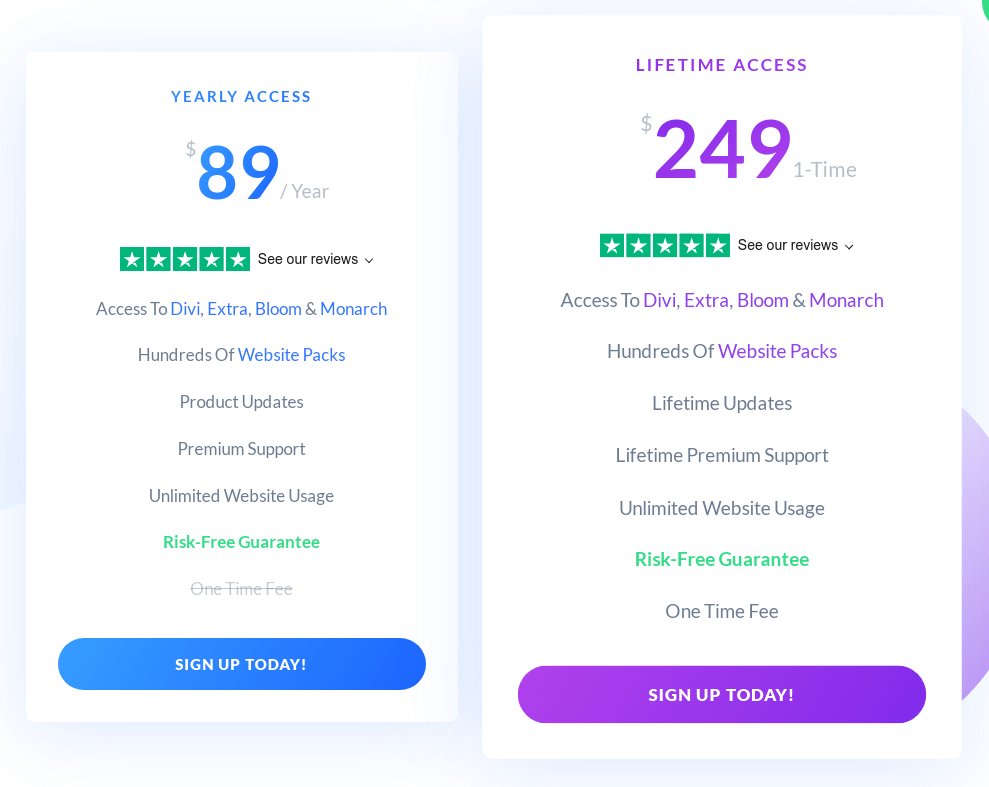
Divi theme price plan

Divi Alternatives

Divi is a popular drag-and-drop page builder. It does not require any code or programming knowledge to use and it can create simple and complex one as well.

But there are some Divi Alternatives such as Elementor, Thrive, Astra. 

In addition to its extensive library of over 200+ premium-quality layouts, this powerful theme also offers unlimited access to its live customizer tools—a user-friendly interface that lets you customize your site in real time.

These customizer tools allow users to make changes and preview them with just one click, so you don’t have to spend hours making adjustments.

Divi Help and Support

Divi has a strong support system for members with documentation, Facebook community, chat section with email integration with intercom.

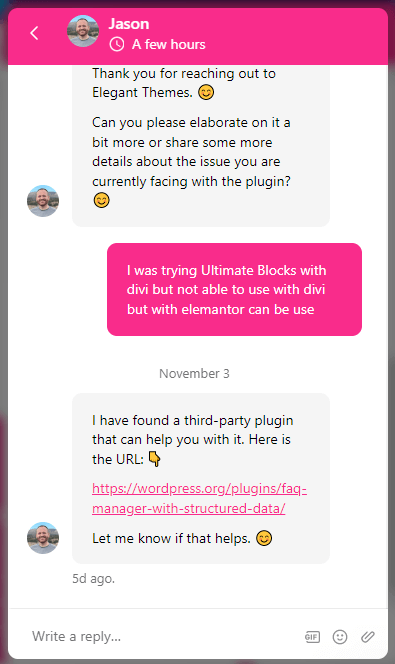
They have more than 4860 blogs/articles of all Categories. The divi support Center fixes your problems very quickly and efficiently with their smart support team and gives you the solution within a few hours.
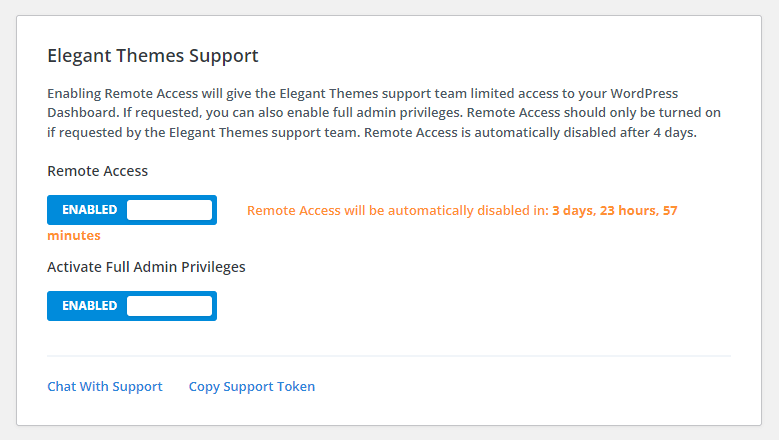
They find the best way to solve your website problems with alternatives easy as well.

See how fast the customer support team resolves my query.
Conclusion

If you’re looking for the ultimate WordPress theme and page builder, then look no further. Divi is an Elegant Themes product that is both powerful and easy to use.

With this theme, you can create responsive websites with ease and without any coding knowledge. If you’re a beginner or an experienced web developer, Divi is perfect for your needs to build your website.

What more……….?

With this theme, you’re getting everything you need to build responsive websites with no code necessary!


The Complete Guide to Write Blogging

The Complete Guide to Write Blogging

Blogging is one of the most popular ways to share your thoughts, opinions, and expertise with a wider audience. It is also a great way to establish yourself as an authority in your field.

It’s not too difficult to set up a blog, but there are some steps you need to take before you can start blogging. If you want to write a blog post on WordPress, there are a few things that you need.

Introduction: What is Blogging and Why Should I Do It?

Blogging is an excellent way to express your thoughts, feelings, and ideas. Blogging is a great way to share your expertise with the world.

You can also blog about your passions and hobbies or write about current events that are happening in the world.

Blogging is one of the best ways to build a following online and make money from it. If you have a blog that has regular content updates,

then you are more likely to get noticed by people who are looking for blogs on certain topics.

How to Start a Blog the Right Way for Successful Content Marketing?

It is not easy to start a blog But, the first step to starting a blog is understanding why you want to start one.

Blogging can be a great hobby or it can be your full-time job as content marketing.
There are many different blogging platforms and each one has its own strengths and weaknesses.

Most bloggers would recommend WordPress as the best blogging platform and I do the same because it is free and easy to use, but there are other options available as well such as Tumblr and Blogger.

A blog is a great way to communicate with your customers and prospects and to build a community around your company.

Blogging also gives you the opportunity to share your knowledge, expertise, and experience with others in the industry.

This guide will help you get started on blogging for success.

Blogging tools WordPress Blogger Tumblr

The Ultimate Guide to Creating an Effective Blog Post

The best way to think about a blog post is as a conversation. It should invite the reader to engage in the topic, share their thoughts and opinions, and learn something new.

This is not an easy task, but it can be done by following a few simple steps. These steps will help you create the ultimate guide for creating an effective blog post.

  • Create a Great Headline for Readers

Headlines are the most important part of a post. They should be catchy and informative.
Headlines are critical to the success of any blog post, article, or social media update.

They provide context for the reader and offer an easy way to skim content before deciding to read it in full.

Headlines make it easier for readers to find what they’re looking for on a page, which means more people will click on your content and that means better search engine rankings.

Without a headline, there is no roadmap and so their post goes in multiple directions, leaving readers feeling lost or confused about what you want them to take away from your message.

How To Write Headlines That Engage Readers?

The headline is the first thing people see when they visit your blog or website. It’s also the first piece of writing a reader sees—and it sets the tone for how the rest of your content will be presented.

To get readers to take notice and keep reading,

you need effective headlines that engage them and draw them in. But not all headlines are created equal. Some are so dull and generic that only an algorithm would find interest in reading them.

Others use keywords in such an over-the-top way that there’s no wonder no one wants to read about it.

You need to write headlines that resonate with your readers, get their attention, and encourage them to keep reading for more details about whatever it is you’re writing about.

Let’s take a look at some tips on how you can write captivating headlines that grab your target audience’s attention:

Examples:

  • 10 Confidence Boosters7 Ways to Look Younger.
  • 7 Ways to Get Fit Without Even Trying.
  • 5 Outfits Every Woman Should Have in Her Closet.

Simply go to Google and search the headline want to in the double quotation, An example:

"best blogging courses that can earn money"
Google Search Result Not Found-best blogging courses that can earn money
  • Write an Introduction to grab the attention

The introduction is the first thing that a reader will read. It’s your chance to grab their attention and make them want to read more of your content.

The introduction should be short, but it should also be interesting and engaging enough to keep the reader reading.

It’s important to keep in mind that you have only a few seconds or one minute at most for people to decide whether they are going to stay on your page or not.

  • Know Your Target Audience

This is the most important thing to remember when you are writing a blog. You need to know who you are writing for and what they want to read about.

If you do not know this, then it will be difficult for you to write a blog that will appeal to your target audience.

The first thing that you should do is research the topic of your blog and find out what information people are looking for in relation to that topic.

You can use Google Trends or Google AdWords Keyword Tool for this purpose.

You can also ask family and friends what they would like to read about on this topic or look at any social media pages related with the topic of your blog, such as Facebook groups, LinkedIn groups, and forums in order to find out more information about what people want from blogs on this topic.

Secondly, think about who your target audience might be before you start writing because it will affect everything else that you do when writing a blog.

  • Create a Blog Strategy

Blog strategy can be used for personal or professional purposes. For example, if you are trying to improve your personal brand or build a business, you will need to have a blog strategy in place.

Your goal might be to increase your visibility on social media or generate traffic for your website. If you are blogging for work, it’s likely that you will want to focus on generating leads or increasing sales.

A blog strategy is a plan to create and maintain a blog. It includes the goals of the blog, the target audience, and how often content will be published.

Some bloggers use their blogs as an opportunity to experiment with different types of content in order to figure out what works best with their audience.

Others stick primarily with one type of content so they can focus on perfecting it without being distracted by other topics that don’t interest them.

  • Analyze Your Competitive

Competitive analysis is the process of analyzing the strengths and weaknesses of a company’s competition. It is a way to identify strategic opportunities and threats.

This process can be done in many ways, but it usually involves looking at competitors’ products, prices, marketing strategies and distribution channels.

The goal of this process is to figure out what they are doing well and what they are not doing so well.

It’s important that you do your research before diving into writing your blog post.

You should know who your competitors are and have an idea of their strengths and weaknesses.

This will help you create a better blog post that will stand out from the rest in your niche or industry.

  • Promote Blog on Social Media

Promotion of a blog is crucial to its success. There are many ways to promote your blog, but the most effective way is by using social media.

Here are some tips for promoting your blog on social media:

  1. Create a Facebook page, Instagram account.
  2. Share your posts on Twitter and LinkedIn also.
  3. Use hashtags in your posts while posting.

How to Choose the Best WordPress Theme For Your Website?

WordPress platform is the most popular blogging tool in the world. It has more than 60 million websites and over 100 million blogs hosted on it.

WordPress is also open source, which means that it is free to download and use. There are many different themes available for WordPress, but not all of them are equally good.

A lot of people struggle with choosing a theme for their blog or website because they don’t know what to look for when picking one.

There are many different types of WordPress themes out there, each with their own strengths and weaknesses.

The best way to find the perfect theme for your needs is by looking through the features that each theme offers and then finding one that suits you best.

WordPress Themes

Conclusion: The Benefits of Starting A Blog For Your Business

Blogging is one of the most popular ways for businesses to reach out to their target audience.

It is a great way to connect with customers, potential customers, and the general public.

Blog posts are written in a conversational tone that is easy for readers to understand and relate to.

They are also able to reach a wider audience than any other type of content you could create on your website.

Blogs have been proven to be more effective than social media or email marketing when it comes to customer retention and conversion rates.

CRM in Retail

CRM in Retail Book
Read Buy Now